Summary
Grok Imagine, built on xAI's Aurora, is strong for portraits, illustration and story-driven concept art, but weak on abstract technical backgrounds, precise prop control and editing, according to nine tests by the Everypixel team.
- The image model debuted at #4 on Arena.ai's blind image ranking with a score of 1,170, above Flux-2-Max and Nano Banana
- Aurora predicts mixed text and image tokens like a language model rather than being diffusion-based
- A children's book fox illustration scored practical value 9.8 and aesthetic appeal 10.0 on the first generation
- Weak spots: abstract backgrounds ("lines without an idea") and complex prop control, where the shorter prompt scored higher than the detailed one
- Alternatives named: Qwen Image 2.0 or Qwen Image Edit for editing, Nano Banana 2 for fast volume iteration, FLUX.2 for cinematic atmosphere without people
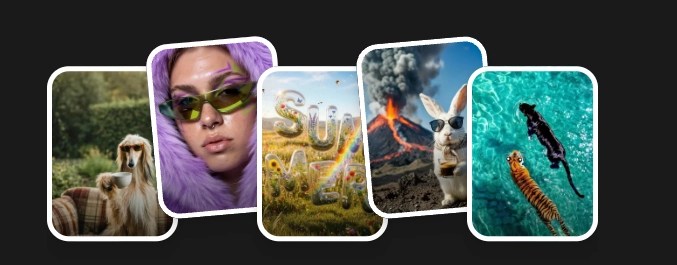 What Are Your Ideas Today?
Does xAI’s Image Model Deserve a Spot in Your Stack?

When xAI released Grok Imagine, most people filed it under “chatbot feature”, played with it’s Spicy mode and moved on. That was a mistake. The image model behind it debuted at #4 on Arena.ai’s blind image ranking with a score of 1,170 — above Flux-2-Max and Nano Banana on its first appearance on the leaderboard. We put it through nine real creative scenarios to understand what those numbers actually mean when you’re staring at a blank prompt field.
What makes Grok different
Most image generation models you use daily are diffusion-based — they start from noise and gradually resolve toward an image, treating your prompt as a visual target. The engine Aurora works more like a language model: it predicts what comes next from a sequence of mixed text and image tokens, building images through contextual reasoning rather than pattern-matching texture against a description.
In practice, this means Aurora reads the logic of a scene, not just its visual surface. You’ll see why that matters in a moment.
Test 1: People


We started with the benchmark that exposes model weaknesses fastest — human portraits. A simple brief: “Beautiful realistic girl, 25 years old, cosmetics advertising, soft light, natural makeup, premium style.” Grok returned something one tester called “a well-retouched photograph — not natural, but commercially attractive.”
Practical value: 9.2.
Prompt adherence: 9.2.
The detailed pro version specified skin texture, 85mm lens depth of field, studio setup, direct eye contact. Scores held: visual quality 9.0, aesthetic appeal 9.0. One note came up consistently — resolution stops short of the micro-detail level where pores and individual hair strands emerge. The skin reads beautiful before you zoom in. After that, it reads like a very good render.
FLUX.2 Klein and Pro win on atmosphere and material feel in scenes without anatomical requirements. For portrait-forward commercial work, Grok competes.
Test 2: Details and illustration


This is where the data gets interesting. “Cute 2D illustration for children’s book, fox in the forest found a lantern, fairy tale atmosphere” — five words of creative direction — earned near-perfect scores across the board.
Practical value: 9.8.
Aesthetic appeal: 10.0.
Ready to use without touch-ups on first generation.
The detailed watercolor brief performed identically. Grok didn’t need the extra specification to get there — it extrapolated the emotional logic of a fairy tale scene from minimal input and made decisions that held up.


The game concept art test revealed the same instinct. We asked for a stone bridge in fog with no characters. Grok added figures anyway — well-integrated, narratively coherent, as if it understood what kind of scene this was supposed to be and acted accordingly. Our tester noted: “Grok fills in scenes intelligently. Characters weren’t in the prompt but they’re well-embedded in the story of the image.”
This is the clearest expression of what Aurora’s architecture produces: creative inference, not just visual compliance.
Where Grok reaches its ceiling
Abstract technical backgrounds were the most consistent weak point. Landing page heroes and pitch deck visuals scored lowest for aesthetic appeal — one comment: “lines without an idea.” The model generates something that technically fits the description but misses the compositional intelligence that makes a background usable.

Complex prop control failed under pressure. A YouTube thumbnail requiring a phone facing a specific direction, w/ith a specific icon, surrounded by a high-energy composition — the detailed pro prompt produced the prop facing the wrong way and text artifacts. Interestingly, the shorter casual brief scored higher. The model does worse when you try to over-direct it on spatial specifics.

For precision editing tasks — replacing backgrounds, repositioning objects, rewriting text within an existing image — Qwen Image 2.0 would be better choice with its unified generation-editing architecture. That’s a different job than what Grok does best.
The pattern, and what it means for your workflow
Grok rewards creative latitude. Give it a scene with emotional logic — a character, a mood, a story — and it fills in the gaps better than you asked. Give it a technical brief with layout requirements, object placement constraints, or design system precision, and it starts to drift.

This isn’t a model for control. It’s a model for the cases where you half-know what you want and can trust the result to take you somewhere worth going.
For rapid volume iteration on concept variations, Nano Banana 2 remains the fastest path at roughly half the credits. For cinematic atmosphere and material depth in scenes without people, FLUX.2 is still the default. For editing existing images with precision, Qwen Image Edit handles what Grok can’t.
Grok Imagine’s place is the creative middle: portrait-forward commercial work, illustration and character-driven scenes, concept art where the model’s narrative instinct is an asset rather than a risk. At its price point on Arena’s benchmark Pareto frontier, it’s competitive where it counts. The question is whether your work gives it room to think.